Price a job and send the customer a quote in minutes, not hours.
I build quote and pricing tools for small businesses, in a spreadsheet or as a simple web tool. We agree the result in your own words, then you pay one price for it, from £180.
Results you could ask for
These are examples. On the free call we write yours in your own words, with a way for you to check it.
- I can price a job and send the customer a PDF quote in under 5 minutes.How you check it: time yourself on a real job.
- I pick an item from my own price list and the price fills in, so nobody retypes it.How you check it: pick three items. The prices match your list.
- I change a markup once and every total updates.How you check it: change a markup. The grand total moves.
- The customer sees a clean quote that hides my internal rates.How you check it: send yourself a test quote. No internal rates on it.
In a spreadsheet, or on the web
Most quote tools start as a spreadsheet, because you can use it the same week. Some grow into a web tool when more people need it.
- A spreadsheet with saved rates, line totals that add themselves up, overheads, and a clean summary to send to the customer. Quickest and cheapest.
- A simple web tool when several people estimate at once or need it on a phone. Saved rates are shared by every estimate.
- It remembers your work. The web version saves as you go and keeps earlier versions you can go back to.
- Warning marks on lines that need a second look, so a mistake is caught before the customer sees it.
An example: bid pricing for a building contractor
The job. Every job was priced by hand across loose sheets.
What I built. One Excel workbook with saved rates, line totals that add themselves up, overheads, and a clean bid summary to send to the customer. It then grew into a web app that does the same job in a browser.
‘The tool provided a customized solution for our firm which was quickly adopted and economical to deploy.’
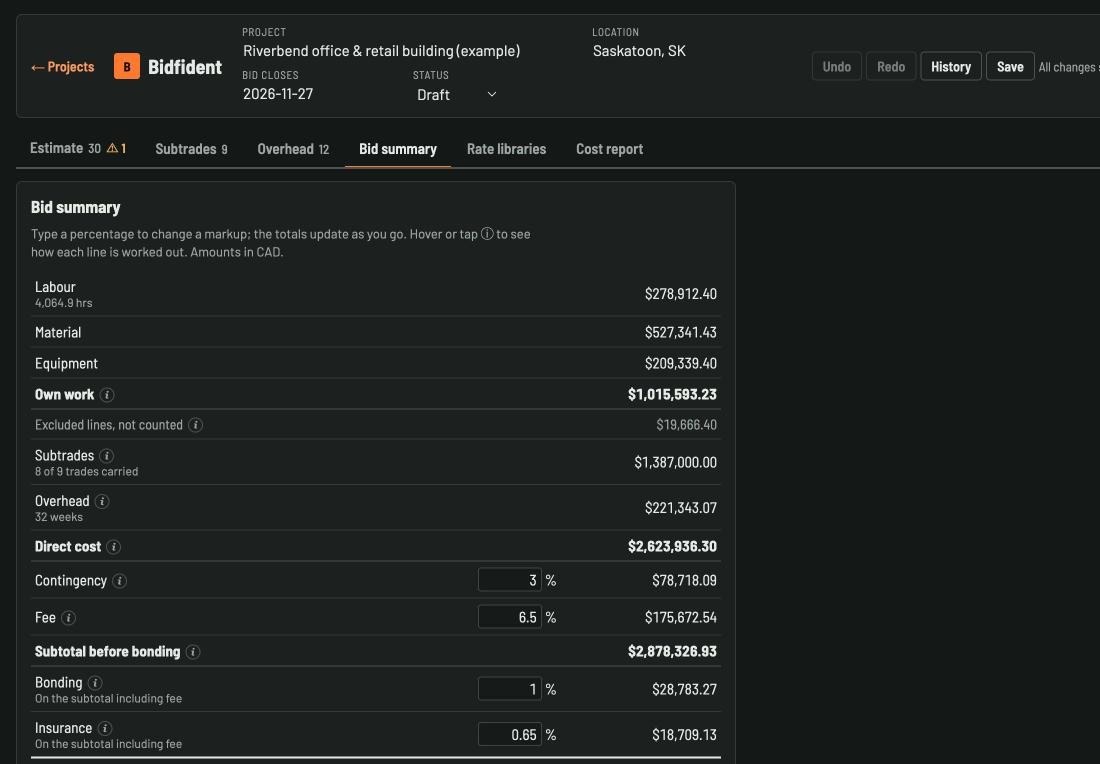
The spreadsheet version. Each line of the job prices itself from a library of rates. Site overhead, contingency and profit are added for you, leaving one clean total to send to the client. Built in Excel.
How a job runs, and what it costs
One fixed price for each result, from £180. You will never get an invoice you haven’t agreed to beforehand.
- Agree. We start with a free call. We write the result in your own words, and you agree one price.
- Pay. You pay for that one result before I start.
- Plan and build. You confirm my list of what I will build, then I build to that list, usually in 1 to 3 days.
- Try it. You test it for about a week. I send a simple guide and help you through it.
- Fix. If it misses what we agreed, I fix it free.
- Hand over. You get your access details and everything you need to use it.
Questions people ask
Can it send the quote as a PDF?
Yes. That is the most common result to ask for. We write it as a test you can run: price a real job and time it.
Can I keep my own price list?
Yes. You pick items from your own list and the price fills in. Change a price once and every new quote follows.
Can my customer see my costs?
No. I can build a customer view that hides your internal rates, while you keep a full view.
Who owns the tool?
You do. Once it’s paid for, it’s yours to use and keep.
Other ways I can help
Quote tools usually sit next to a spreadsheet or a dashboard. These are the two nearest.
Start with a call, or send me your spreadsheet
The first call is free. Tell me what’s slowing you down and I’ll suggest a result you can check, and a price.
Free spreadsheet review
Add a link or attach your spreadsheet in the form and I’ll tell you what I’d fix first and what it would cost. No obligation.
Prefer email? help@sheetrics.com